Admin Integration
django-fsm-rx includes built-in Django admin integration through FSMAdminMixin. This provides transition buttons in the admin change form, allowing staff users to execute FSM transitions directly from the admin interface.
Basic Setup
from django.contrib import admin
from django_fsm_rx.admin import FSMAdminMixin
from myapp.models import Order

@admin.register(Order)
class OrderAdmin(FSMAdminMixin, admin.ModelAdmin):
    list_display = ['id', 'customer', 'state']
    fsm_fields = ['state']  # List your FSM fields
This renders transition buttons below the form for each available transition.
Transition History Inline
To display transition history directly in the admin change form, use FSMTransitionLogInline:
from django.contrib import admin
from django_fsm_rx.admin import FSMAdminMixin, FSMTransitionLogInline
from myapp.models import Order

@admin.register(Order)
class OrderAdmin(FSMAdminMixin, admin.ModelAdmin):
    list_display = ['id', 'customer', 'state']
    fsm_fields = ['state']
    inlines = [FSMTransitionLogInline]
This displays a read-only table of all state transitions for the object, showing:
Timestamp - When the transition occurred
Transition - The transition method name
Source State - State before transition
Target State - State after transition
By - User who triggered the transition (if available)
Description - Optional description
The inline is:
Read-only - Log entries cannot be edited or deleted
Ordered by most recent first - Latest transitions appear at the top
Automatic - Works with any model that has FSM fields (uses GenericForeignKey)
Requirements
The inline requires audit logging to be enabled (default). If you’ve disabled audit logging, the inline will be empty:
# settings.py
DJANGO_FSM_RX = {
    'AUDIT_LOG': True,  # Required for FSMTransitionLogInline to show data
}
Migration from django-fsm-admin
If you’re migrating from django-fsm-admin or django-fsm-2-admin, your existing code will work with the compatibility shim:
# Old (still works via compatibility shim with deprecation warning)
from django_fsm_admin.mixins import FSMTransitionMixin

# New (recommended)
from django_fsm_rx.admin import FSMAdminMixin
FSMTransitionMixin is aliased to FSMAdminMixin for backwards compatibility.
Key Differences
Feature |
django-fsm-admin |
django-fsm-rx |
|---|---|---|
Mixin class |
|
|
Attribute name |
|
|
Templates |
Separate package |
Included |
Cascade widget |
Not included |
|
Import Changes
# Before (django-fsm-admin)
from django_fsm_admin.mixins import FSMTransitionMixin

class OrderAdmin(FSMTransitionMixin, admin.ModelAdmin):
    fsm_field = ['state']  # Note: some versions used singular 'fsm_field'

# After (django-fsm-rx)
from django_fsm_rx.admin import FSMAdminMixin

class OrderAdmin(FSMAdminMixin, admin.ModelAdmin):
    fsm_fields = ['state']  # Always use plural 'fsm_fields'
Custom Transition Labels
Use the custom parameter on transitions to customize how they appear in admin:
from django_fsm_rx import FSMField, transition

class Order(models.Model):
    state = FSMField(default='pending')

    @transition(
        field=state,
        source='pending',
        target='approved',
        custom={'label': 'Approve Order', 'admin': True}
    )
    def approve(self):
        pass

    @transition(
        field=state,
        source='pending',
        target='rejected',
        custom={'label': 'Reject', 'css_class': 'btn-danger'}
    )
    def reject(self):
        pass
Custom Properties
Property |
Description |
|---|---|
|
Display text for the button (default: method name) |
|
Show in admin (default: True). Set to False to hide |
|
Additional CSS class for the button |
|
Django form class for transitions requiring input |
Transition Forms
For transitions that require additional input:
from django import forms
from django_fsm_rx import FSMField, transition

class RejectForm(forms.Form):
    reason = forms.CharField(widget=forms.Textarea)

class Order(models.Model):
    state = FSMField(default='pending')
    rejection_reason = models.TextField(blank=True)

    @transition(
        field=state,
        source='pending',
        target='rejected',
        custom={'form': RejectForm}
    )
    def reject(self, reason=None):
        if reason:
            self.rejection_reason = reason
When a form is specified, clicking the transition button shows a modal with the form fields.
FSMCascadeWidget
When using hierarchical status codes, the standard dropdown becomes unwieldy with dozens of options. FSMCascadeWidget renders cascading dropdowns that filter based on selection.
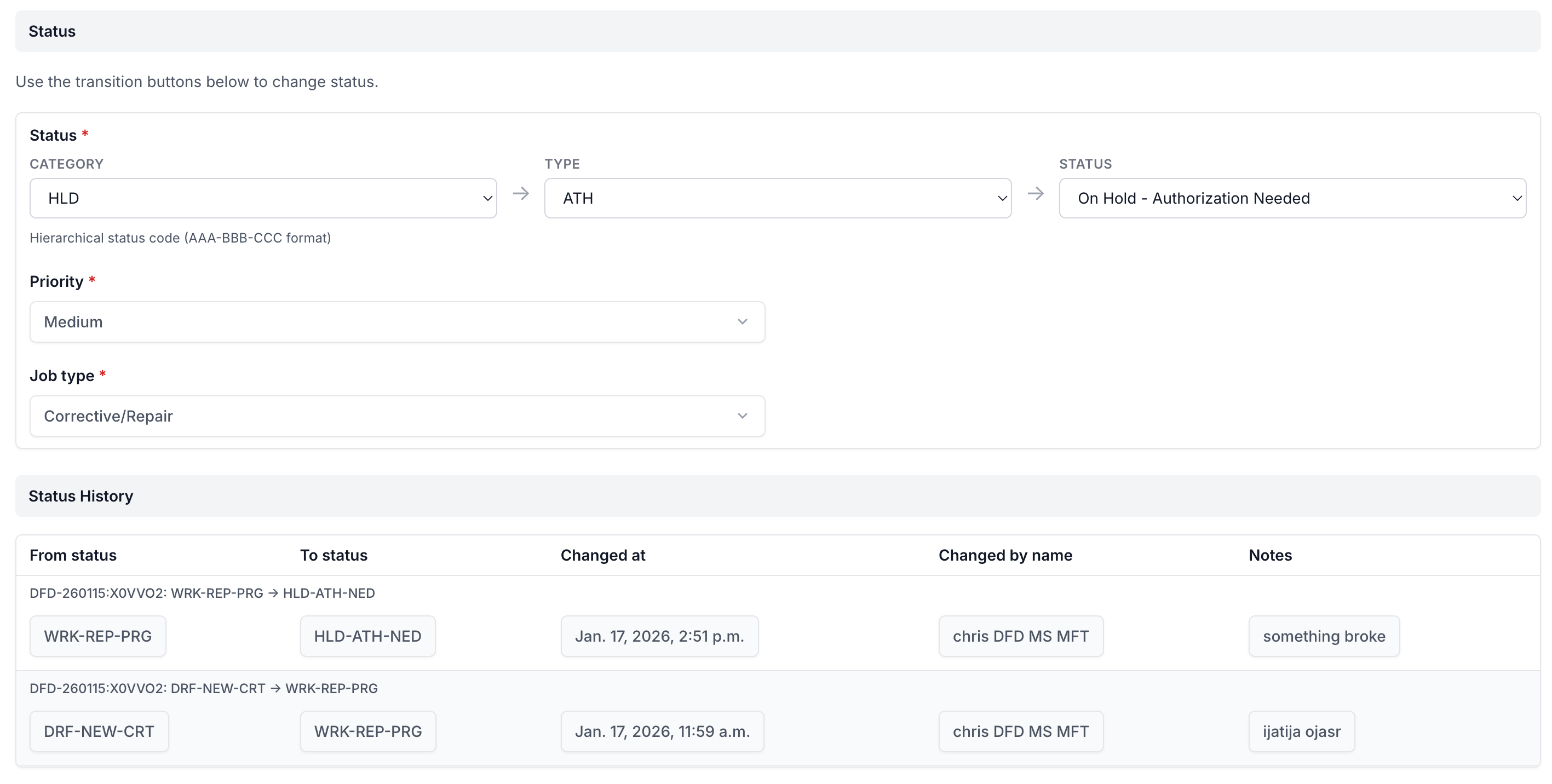
The cascade widget showing three linked dropdowns (Category → Type → Status) with status history below.
Basic Configuration
from django.contrib import admin
from django_fsm_rx.admin import FSMAdminMixin

@admin.register(RepairOrder)
class RepairOrderAdmin(FSMAdminMixin, admin.ModelAdmin):
    list_display = ['id', 'customer_name', 'status']
    fsm_fields = ['status']

    # Configure cascade widget
    fsm_cascade_fields = {
        'status': {
            'levels': 3,           # Number of dropdown levels
            'separator': '-',      # Character separating levels
            'labels': ['Category', 'Type', 'Status'],  # Dropdown labels
        }
    }
How It Works
Instead of one dropdown with all options:
[Select Status ▼]
  DRF-NEW-CRT - Draft - New - Created
  DRF-NEW-EDT - Draft - New - Edited
  SCH-REP-CRT - Scheduled - Repair - Created
  SCH-INS-CRT - Scheduled - Inspection - Created
  WRK-REP-PRG - Work - Repair - In Progress
  ... (20+ more options)
The cascade widget renders three linked dropdowns:
[Category ▼]     [Type ▼]        [Status ▼]
   DRF              NEW             CRT
   SCH              REP             EDT
   WRK              INS             PRG
   QC               MNT             HLD
   CMP                              DON
   CAN                              FAI
When you select “WRK” in Category, the Type dropdown filters to show only types available under WRK:
[Category ▼]     [Type ▼]        [Status ▼]
   WRK ✓           REP             PRG
                   INS             HLD
                   MNT
Manual Widget Configuration
For more control, configure the widget directly:
from django_fsm_rx.admin import FSMAdminMixin
from django_fsm_rx.widgets import FSMCascadeWidget

@admin.register(RepairOrder)
class RepairOrderAdmin(FSMAdminMixin, admin.ModelAdmin):
    fsm_fields = ['status']

    def formfield_for_dbfield(self, db_field, request, **kwargs):
        if db_field.name == 'status':
            # Get the object being edited (if any)
            obj = getattr(request, '_editing_obj', None)

            kwargs['widget'] = FSMCascadeWidget(
                levels=3,
                separator='-',
                labels=['Category', 'Type', 'Status'],
                choices=RepairOrder.STATUS_CHOICES,
                # Optionally filter to allowed transitions only
                allowed_targets=self._get_allowed_targets(obj) if obj else None,
            )
        return super().formfield_for_dbfield(db_field, request, **kwargs)

    def _get_allowed_targets(self, obj):
        """Get list of states this object can transition to."""
        transitions = obj.get_available_status_transitions()
        return [t.target for t in transitions]
Widget Options
Option |
Type |
Default |
Description |
|---|---|---|---|
|
int |
2 |
Number of dropdown levels |
|
str |
|
Character separating levels in status code |
|
list |
|
Labels for each dropdown |
|
list |
|
List of |
|
list |
|
Filter to only these target states |
Styling
The widget includes CSS for both light and dark modes. Customize by overriding in your admin CSS:
/* Custom cascade widget styling */
.fsm-cascade-widget {
    display: flex;
    gap: 1rem;
}

.fsm-cascade-widget select {
    min-width: 150px;
}

.fsm-cascade-widget label {
    font-weight: bold;
    margin-bottom: 0.25rem;
}